Let's take the following tags:
So Html file always starts and ends with marking <HTML> marking </ HTML>. Do not forget it!
The <HEAD> tag identifies the beginning of the section that contains information on the definition of the page. As the title appears on the browser address bar . This title in turn needs to be placed between Alosmen : <TITLE> ... </ TITLE> Of course, you must write tag </ HEAD> in order to finish this section.
We come to <BODY> tag which is written texts web page within it , in addition to the inclusion of images, tables, and the rest of the contents of the page. He also needs to finish marking </ BODY>
What do you think if we start applying this information in a practical way ? Come on ... open Notepad and type the following:
<HTML><HEAD><TITLE>This is a test Webpage</ TITLE></ HEAD>
<BODY>Wow, I'm writing my first webpage</ BODY></ HTML>
Now save the file and typed in any name you choose. And do not forget that the extension is used in the names of HTML files is htm. Or html. For example, I chose the name 1st_file.htm It is best that you create a separate folder on the hard drive in order to save its files , it is easy for you to show the process of retrieval , update, and not by name , for example, this folder C: \ htmfiles ( or any name you wish ) .
It's time to show, in order to see the result of what we have written . Turn on your Internet browser . If Netscape Navigator Select Open File ... command from the menu File. In MS Internet Explorer select it from the list of Open ... File. Then select the path that has the file. I personally you select the following path:
C: \ htmfiles \ 1st_file.htm
And , of course, according to previous assumptions that followed when the file is stored . This is what I got :
The <HEAD> tag identifies the beginning of the section that contains information on the definition of the page. As the title appears on the browser address bar . This title in turn needs to be placed between Alosmen : <TITLE> ... </ TITLE> Of course, you must write tag </ HEAD> in order to finish this section.
We come to <BODY> tag which is written texts web page within it , in addition to the inclusion of images, tables, and the rest of the contents of the page. He also needs to finish marking </ BODY>
What do you think if we start applying this information in a practical way ? Come on ... open Notepad and type the following:
<HTML><HEAD><TITLE>This is a test Webpage</ TITLE></ HEAD>
<BODY>Wow, I'm writing my first webpage</ BODY></ HTML>
Now save the file and typed in any name you choose. And do not forget that the extension is used in the names of HTML files is htm. Or html. For example, I chose the name 1st_file.htm It is best that you create a separate folder on the hard drive in order to save its files , it is easy for you to show the process of retrieval , update, and not by name , for example, this folder C: \ htmfiles ( or any name you wish ) .
It's time to show, in order to see the result of what we have written . Turn on your Internet browser . If Netscape Navigator Select Open File ... command from the menu File. In MS Internet Explorer select it from the list of Open ... File. Then select the path that has the file. I personally you select the following path:
C: \ htmfiles \ 1st_file.htm
And , of course, according to previous assumptions that followed when the file is stored . This is what I got :
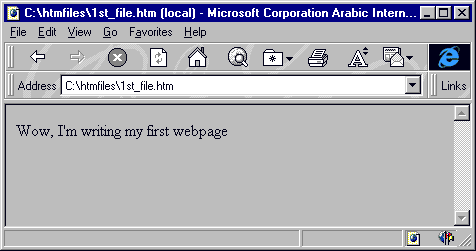
What about you? You got the same result? So Congratulations to J I've created the first Web page of your own.
Before I continue I want to remind you that some of the notes when writing web pages :
There is no difference between the type tags in large English letters UPPERCASE or lowercase letters lowercase. So you can write in any form or even writing them both.
The browsers do not take into account the extra spaces or signals the end of paragraphs (ie, when you press the key Enter) that you find this file browsers in Html. In other words, you can write your former as follows:
<HTML> <HEAD> <TITLE> This is a test Webpage </ TITLE> </ HEAD> <BODY>Wow, I'm writing my first webpage </ BODY> </ HTML>
Or as follows:
<HTML><HEAD><TITLE>Thisis atestWebpage</ TITLE></ HEAD><BODY>Wow,I'mwritingmyfirstwebpage</ BODY></ HTML>
Or even like this:
<HTML> <HEAD> <TITLE>This is a test Webpage</ TITLE></ HEAD><BODY>Wow, I'm writing my first webpage</ BODY></ HTML>
In all cases, you'll get the same result. If you are from those types of people that do not believe everything you said ... you can try it for yourself! ! ! Come try .
But this does not mean that paragraph , for example, consisting of ten lines will extend to several meters width of the screen. Both , of course, because the browser will automatically wrap her job , according to the screen display , no matter the amount of the offer .
Now, you may wonder , then, how can be controlled by the written text on each line and how it can determine the end of the paragraph and the beginning of the paragraph that followed ? Good question ! ! ! The answer is :
We will use the tag <BR> to determine the end of the line . And start a new line ( Note that this is a single tag , which has no marking the end ) .
And go back to the previous example , modify the file so that it becomes as follows
<HTML><HEAD><TITLE>This is a test Webpage</ TITLE></ HEAD><BODY>
Wow, <BR> I'm writing my <BR>first webpage</ BODY></ HTML>
There is no difference between the type tags in large English letters UPPERCASE or lowercase letters lowercase. So you can write in any form or even writing them both.
The browsers do not take into account the extra spaces or signals the end of paragraphs (ie, when you press the key Enter) that you find this file browsers in Html. In other words, you can write your former as follows:
<HTML> <HEAD> <TITLE> This is a test Webpage </ TITLE> </ HEAD> <BODY>Wow, I'm writing my first webpage </ BODY> </ HTML>
Or as follows:
<HTML><HEAD><TITLE>Thisis atestWebpage</ TITLE></ HEAD><BODY>Wow,I'mwritingmyfirstwebpage</ BODY></ HTML>
Or even like this:
<HTML> <HEAD> <TITLE>This is a test Webpage</ TITLE></ HEAD><BODY>Wow, I'm writing my first webpage</ BODY></ HTML>
In all cases, you'll get the same result. If you are from those types of people that do not believe everything you said ... you can try it for yourself! ! ! Come try .
But this does not mean that paragraph , for example, consisting of ten lines will extend to several meters width of the screen. Both , of course, because the browser will automatically wrap her job , according to the screen display , no matter the amount of the offer .
Now, you may wonder , then, how can be controlled by the written text on each line and how it can determine the end of the paragraph and the beginning of the paragraph that followed ? Good question ! ! ! The answer is :
We will use the tag <BR> to determine the end of the line . And start a new line ( Note that this is a single tag , which has no marking the end ) .
And go back to the previous example , modify the file so that it becomes as follows
<HTML><HEAD><TITLE>This is a test Webpage</ TITLE></ HEAD><BODY>
Wow, <BR> I'm writing my <BR>first webpage</ BODY></ HTML>
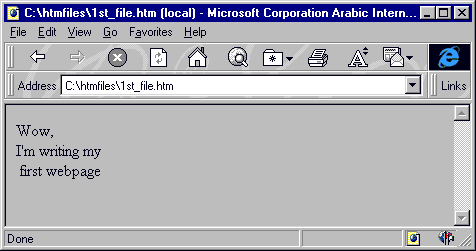
There is also a tag <P> which is almost the same function as that of any previous tag end of the line or paragraph and start a new line, but with the addition of an extra blank line between paragraphs.
More about this tag in the fourth lesson paragraphs
<HTML>
<HEAD>
<TITLE>
This is a test Webpage
</ TITLE>
</ HEAD>
<BODY>
Wow, <P> I'm writing my <P>
first webpage
</ BODY>
</ HTML>
More about this tag in the fourth lesson paragraphs
<HTML>
<HEAD>
<TITLE>
This is a test Webpage
</ TITLE>
</ HEAD>
<BODY>
Wow, <P> I'm writing my <P>
first webpage
</ BODY>
</ HTML>
Speaking
of icons , there are many of these symbols, which should be written in a
certain tags using its image directly and not normal . Take
, for example, my signal is greater than the smallest of the reference
citation . " Each of these signals originally used with the tags are
taken? Within the vocabulary of HTML and it is wrong to use its image
explicit lest lead to problems in the way the page is displayed. Well
there symbols basically non-existent on the keyboard Copyright
© symbol and the symbol of the registered mark ® and we need to this
method ( method tags ) for writing . Here's a table of some of these
symbols and Usumha equivalent . , and draw your eyes to it as it is
written in the table and without my reference <>
We got to the end ... The end of the first lesson. I wish I could have found it fun and interest
We got to the end ... The end of the first lesson. I wish I could have found it fun and interest

